
Searching for the best Kubernetes GUI for Mac is less about finding one universal winner and more about checking the boundaries that matter on your Mac. Does the download match your processor? Does the app use the kubeconfig context and permissions you expect? Can you move from a failing workload to useful evidence without making a change by accident? Can you tell what the package trust warning means?
This is a selection guide, not a ranking. The Mac-specific package facts below come from the current Vastanex release manifest and package configuration. The workflow examples come from accepted built-app captures against the dedicated local kind fixture.
Start with the Mac artifact
Apple Silicon Macs use arm64 processors and older Intel Macs use x64. The Stable 1.0.0 release
does not ask you to choose between two macOS downloads: the manifest lists one universal DMG,
vastanex-1.0.0.dmg. The package configuration targets a universal macOS DMG as well. That
makes the artifact choice simple, but it does not make every other question disappear.
The current manifest says this Stable release needs macOS 12 (Monterey) or later. It also records the exact file size, SHA-256 digest and detached release signature. Use the Download page to check the version, compare the hash after downloading and keep the release date beside the file you install. Do not replace a real manifest value with a generic “latest” claim: a desktop package is a versioned object that should be possible to identify later.
The trust warning is equally important. This DMG is ad-hoc signed, not Developer ID-signed or notarized. macOS may therefore ask for an explicit approval in Finder or Privacy & Security. A checksum and detached release signature help prove which bytes were published; they do not turn an ad-hoc package into a notarized Apple distribution. If your organization requires notarization or a trusted Developer ID certificate today, the Stable 1.0.0 package does not satisfy that requirement.
Check how the app reaches Kubernetes
A Mac desktop shell does not decide whether you can inspect a cluster. The selected kubeconfig context and the Kubernetes API’s RBAC permissions do. The Kubernetes kubeconfig documentation is a useful reminder that a kubeconfig can contain several contexts, clusters and user entries. Choose the context you intend to inspect, and keep test and production contexts separate.
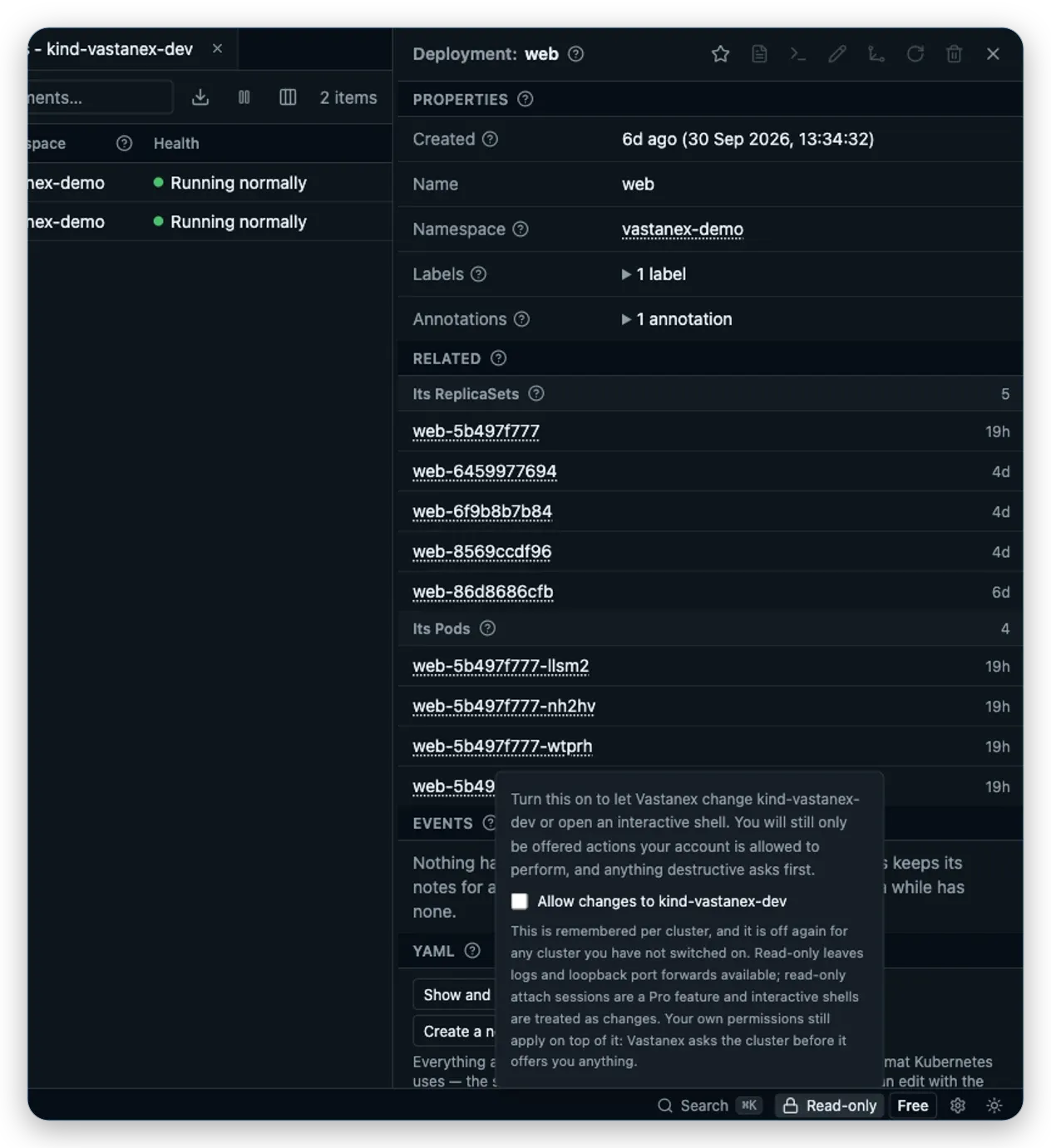
Vastanex starts with the chosen context in read-only mode. The app keeps connection state, server version and the read-only state visible, while unavailable or forbidden data stays labelled rather than being presented as healthy. A user with narrow namespace permissions should see the limits of that account, not a made-up complete picture.
This is also where a Mac-focused comparison should stay honest. A desktop app that reads a kubeconfig is not automatically a cloud-provider discovery tool, an in-cluster web service or a replacement for your organization’s access process. Ask where credentials are read, which API requests are made and how a permission failure is explained.
Prefer evidence that keeps its source
Good Kubernetes desktop work is not only a polished resource table. It is the path from a Problem to the object, its evidence and a sensible next step. Vastanex keeps the raw Kubernetes value next to its plain-language explanation, then lets you inspect details, Events and bounded logs.
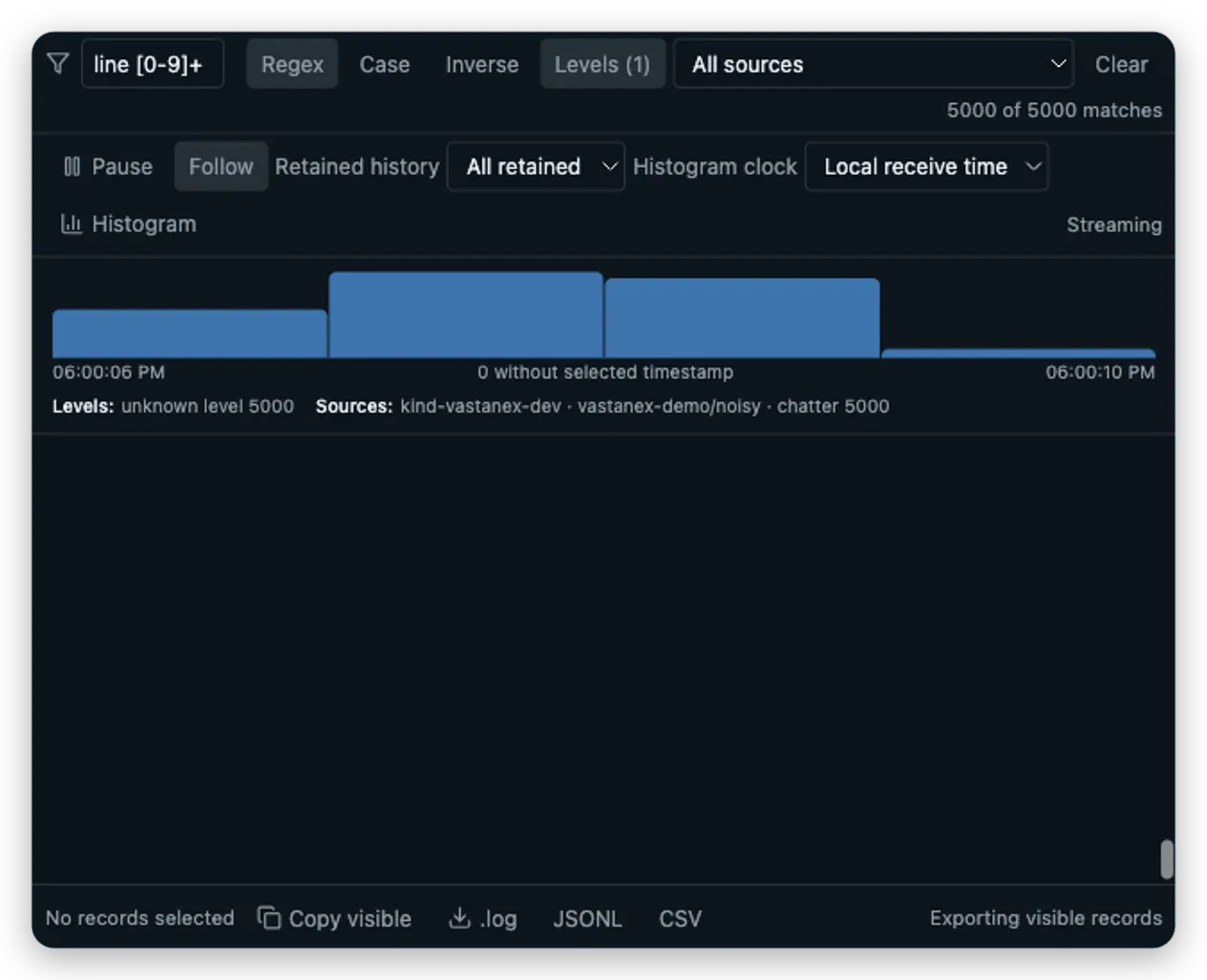
The Log Explorer keeps cluster, namespace, Pod and container identity beside each record. It
supports text, regex, level and source filters, Pause versus Follow, a local histogram and bounded
.log, JSONL and CSV exports. This is useful on a Mac because the desktop is only the surface: the
source still matters when several contexts or similarly named Pods are involved.
Metrics and cost information need a separate check. A cluster may not serve the provider or API needed for a particular reading. Vastanex keeps capability and availability visible; optional cost context reads an existing OpenCost or Kubecost provider and does not invent a price when the local fixture has none.

Make write safety part of the choice
Read-only by default is more useful than a reassuring label if the action behavior is clear. In Vastanex, Allow changes, the current entitlement, Kubernetes RBAC, server-side dry-run, the exact diff and confirmation remain separate gates for supported writes. Logs, read-only attach and loopback forwarding stay distinct from operations that start a process or alter a resource.
When comparing a Mac GUI, open a harmless-looking action and inspect its consequence text. Ask whether the app says which cluster and object it will affect, checks permission near the action, and lets you cancel before the request. A screenshot of a disabled button is not enough if the reason is hidden.
Check privacy and update limits
Vastanex has no automatic telemetry, crash upload or background diagnostics reporting. Cluster data is not sent to the update or licence services. An optional AI advisory is a separate, consented request containing only the bounded, redacted facts that the user reviews.
Update behavior is also platform-specific. Stable Windows and Linux AppImage builds can use the verified signed update feed after explicit restart approval; macOS packages point back to the Download page. Release signatures and hashes are provenance checks, not a promise that every future package will have the same platform trust state. Re-check the current release before installing.
What it does not do
This guide does not rank Mac applications, measure speed or usability, audit another product’s privacy, or claim that a universal DMG is notarized. The current Stable package uses the production Live licence issuer and official checkout. The accepted images show real app states from a local kind fixture, not production-cluster results. Metrics and cost readings remain dependent on the capabilities of the cluster you choose.
Use the Kubernetes desktop client guide for the broader category question, or inspect the Download page for the current package, hash, signature and first-launch instructions.