
Kubernetes objects rarely fail in isolation. A Deployment owns ReplicaSets, ReplicaSets own Pods and a Service may route traffic to those Pods. Configuration and storage add more references. When those relationships are spread across several lists, it is easy to open the right object but miss the path that explains why it matters.
Vastanex gives that path a bounded visual home. Topology is a live diagnostic map built from the same cluster data as the rest of the app. It keeps the object names visible, gives each relationship a reason and lets you open the exact object behind a node.
Start with the workload you recognise
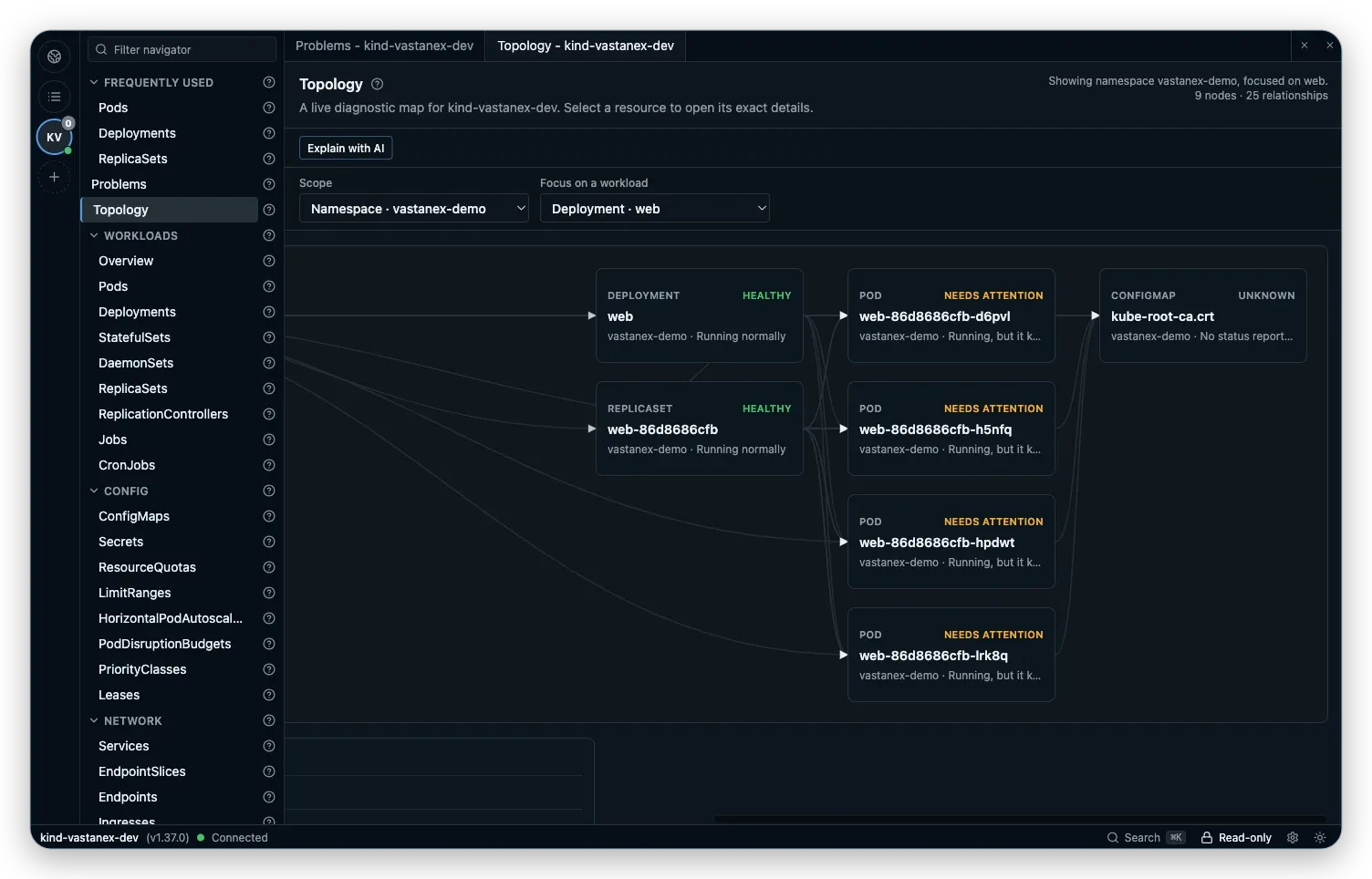
The first useful question is usually not “show me every object.” It is “what does this workload connect to?” Open Topology, choose a namespace and focus on a workload. The view narrows the map while preserving the context that makes the relationship meaningful.
In the local example, the focus is the web Deployment in vastanex-demo. The graph names the Deployment and related Pods rather than reducing them to anonymous dots. The count beside the heading says what scope is visible, so a focused map does not look like an accidental empty cluster view.
That focus is useful when the cluster has enough resources to make a whole-cluster map noisy. It is also useful when you are learning the ownership model: the raw Kubernetes names remain available, while the relationship list gives you a sentence you can follow.
Follow one relationship at a time
The graph is only half of the explanation. Open Relationship details to read the named source, target and relationship reason together. A line between web and one of its Pods is more useful when you can tell whether it represents ownership, selection or another supported connection.
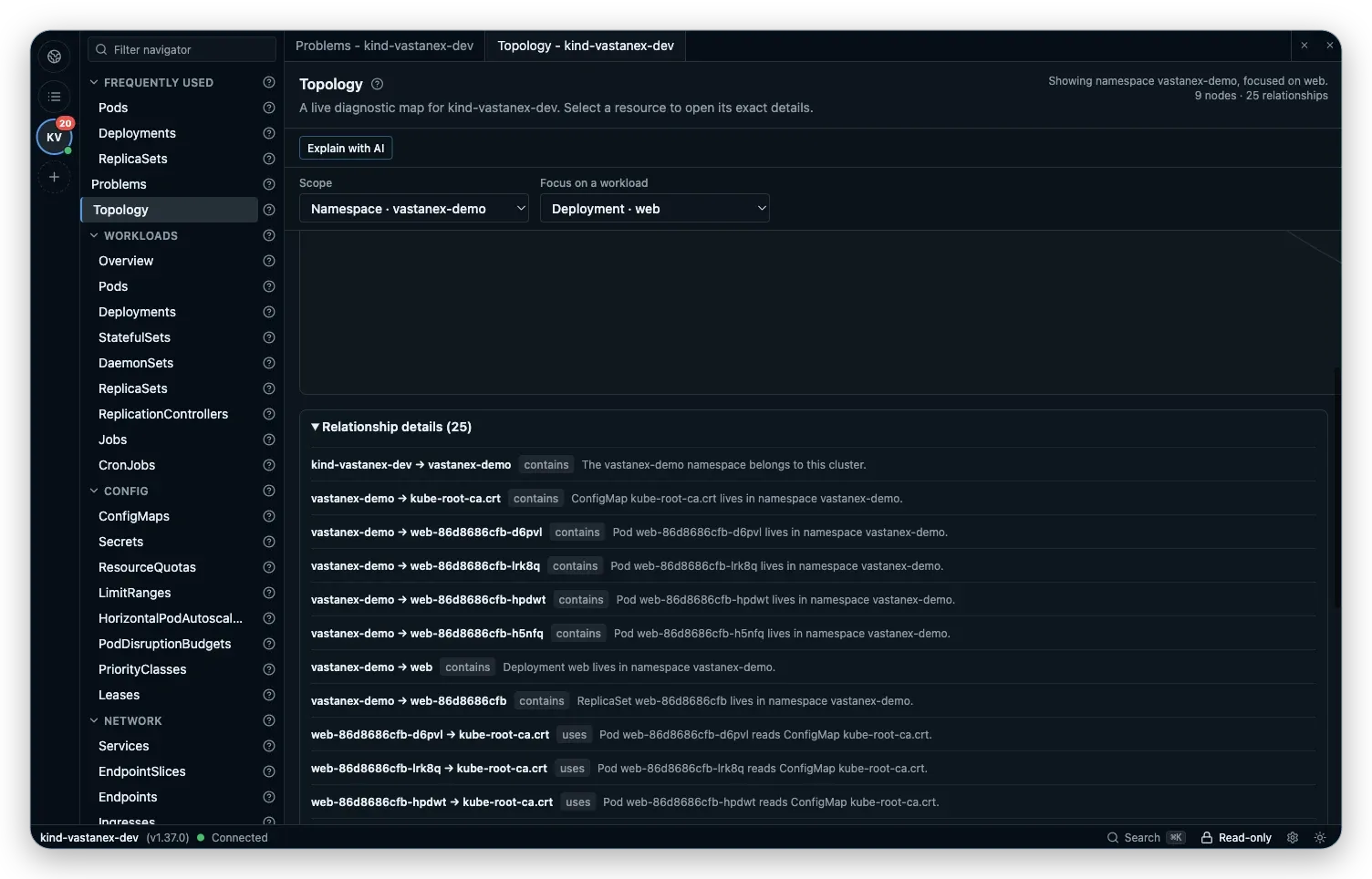
Select a present node to open its normal detail drawer. That keeps the topology view from becoming a separate data silo: Properties, Events, Related objects and YAML are still the evidence surfaces for the object itself. If the next question is about a Pod’s containers or a Deployment’s desired copies, continue in the drawer instead of guessing from a graph shape.
The same principle applies to traffic and configuration relationships. A connection is a prompt to inspect the two objects and the reason they are connected, not a claim that the graph has discovered the application’s full architecture. The map helps you choose the next object; the object view supplies the details.
Keep missing relationships visible
A reference can point at something that is not present in the current snapshot. Topology keeps broken or missing relationships visible and labels them instead of drawing a reassuring complete picture. That distinction matters during a rollout, after a deletion or when permissions prevent a complete read.
The graph is bounded to 120 nodes and 240 edges. A notice explains when the most useful subset is being shown, and namespace or workload focus can reduce the noise. Those bounds make the view readable and predictable; they are not a promise that every object in a large production cluster will fit on one screen.
What it does not do
Topology is an explanatory view, not a full graph database. It does not infer an application architecture that Kubernetes has not expressed through supported references. A relationship on screen is not proof that a rollout completed, that traffic is healthy or that an object should be changed.
The graph does not repair broken references or replace Events, logs, YAML or permissions checks. It also does not turn a focused view into a write target. When a change is appropriate, the app’s separate read-only and confirmation controls still apply.
Start with the Download page to see the current desktop availability, then read how Vastanex keeps GitOps status separate from Git changes or reviews YAML before a dry-run.